SolutionsDatasetsAnonymising IPs
Residential proxy, VPN and Tor detection
Webscout exposes the infrastructure adversaries use to hide online, enriching every IP with real-time intelligence on geolocation, network ownership, VPNs, Tor, residential proxies and provider attribution. Delivered by API, bulk feed or SIEM integration, it turns anonymity into actionable evidence.
From noise to signal
The same logs, with context
Whatever the source, from firewall and Zeek logs to flows and web logs, network telemetry records a connection as little more than an address. Webscout context finds the needles in the haystack, for analysts and automated systems alike: connections hiding behind VPNs, residential proxies and Tor stand out, named and grouped.
The same lines, matched against Webscout’s anonymisation dataset. Matches are named, classified and grouped by provider; select one to see the evidence.
What you get
See through VPNs, residential proxies and Tor
01
90,000,000+Anonymising IPs tracked
VPN and proxy detection
Addresses that belong to commercial VPN and proxy services, mapped to the service.
02
150+Providers tracked, and counting
Residential proxy mapping
Residential proxy exits, the hardest cover to spot, attributed to their provider.
03
100%Of public Tor relays, in real time
Tor
Every public entry, middle and exit relay attributed in real time, alongside the commercial services.
04
Pool types
Whether an address was seen in a datacenter or residential pool, per provider.
05
Observation window
First- and last-seen times for every provider and pool.
06
Confidence
How the address matched Webscout’s observations, for example an exact match.
Use cases
Expose the connections that hide their origin
Attackers, fraudsters and automated tools route through VPNs, residential proxies and Tor so that every attempt arrives from a fresh, ordinary-looking address. Webscout flags the connections that conceal where they come from, and attributes each one to the anonymisation service behind it as supporting context. A match describes the connection, not the person behind it.
01
Account takeover
Credential-stuffing tools rotate through residential proxy exits, so every attempt arrives from a different, ordinary-looking address. Flag logins that conceal their origin and step up authentication instead of trusting the address.
02
Fake accounts and promotion abuse
Multi-accounting needs a fresh, unremarkable address for every sign-up. Flag new accounts that hide where they come from; a provider shared across them helps expose the account farm that per-address limits never see.
03
Payment fraud
Card testing and checkouts with stolen cards often hide behind anonymising services that place the buyer near the cardholder. Flag transactions that conceal their origin, and weigh the provider and pool type beside billing and device signals.
04
Bots and scraping
Automation spread across residential proxy pools looks like thousands of ordinary visitors. Separate the relayed requests from real ones; the provider behind them shows one operation where rate limits see many users.
05
Location and sanctions checks
The apparent location of a VPN or proxy exit says nothing reliable about where the user is. Know when a connection is masking its true location before you rely on it for licensing, geo-restriction or sanctions screening.
06
Threat detection and investigation
Label sessions whose far end hides behind a VPN, residential proxy or Tor node in your SIEM, NDR or the Webscout Observability Platform, with the attributed provider as context for the investigation.
Access
One dataset, four ways in
Take the data the way your team already works. Open it in the Webscout Observability Platform, query it over the API, download the whole dataset for your own pipelines, or feed it into your SIEM, NDR, EDR or threat intelligence platform. The records and fields are the same whichever route you take, so you can start with one and add another later.
- The same
webscout_anonymizationfields in every channel - Updated continually, in real time
- Platform in the cloud, on premises or air-gapped
- mmdb · jsonl · csv · parquet
Open it in the platform
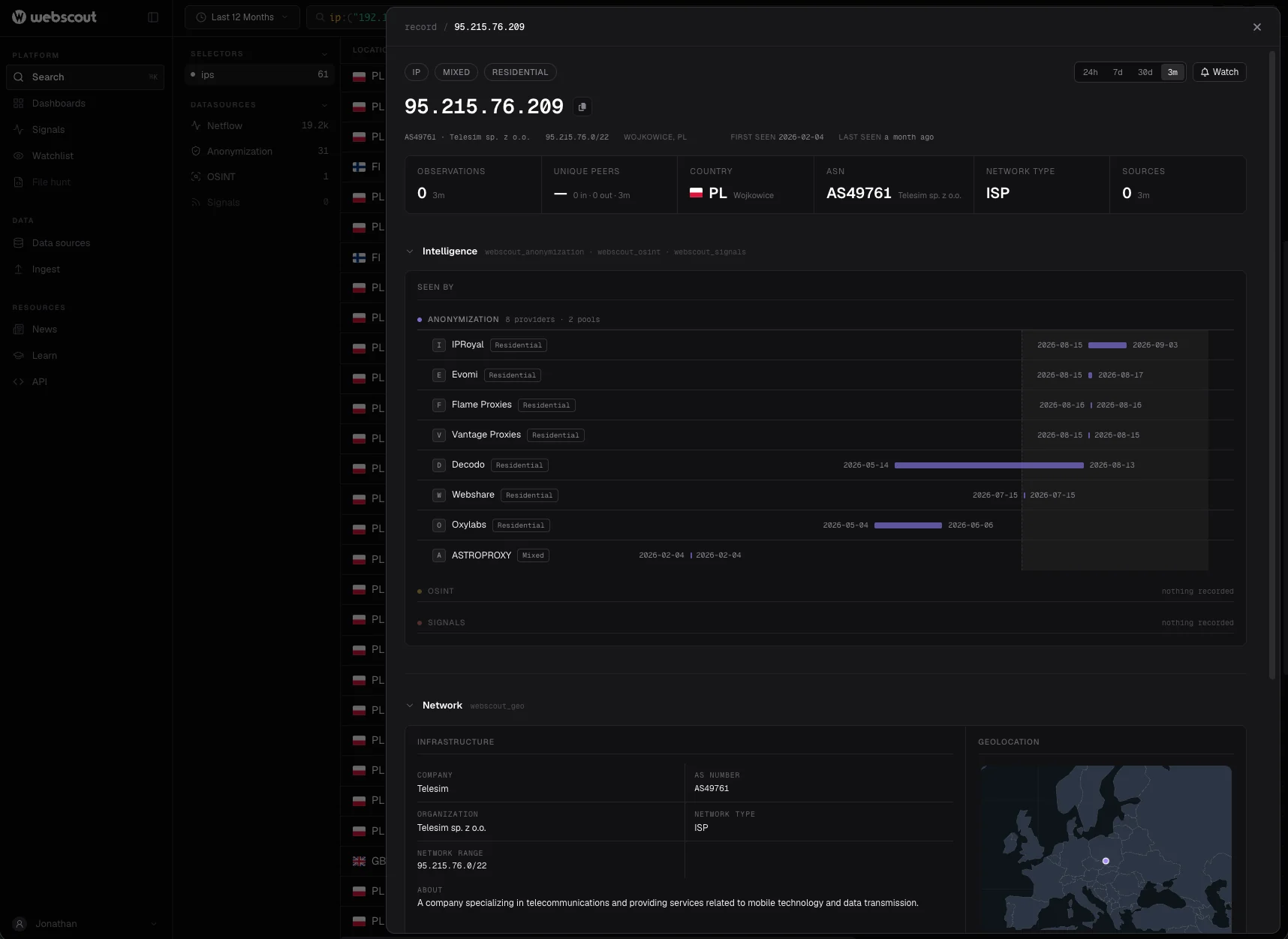
Anonymisation context is applied automatically to every IP lookup and every event in the Webscout Observability Platform, so analysts see the provider behind an address without leaving the investigation.
Query it over the REST API
Look up a single address, or up to 100 per request with the bulk endpoint. Authenticate with an API key; every response carries the same enrichment.
curl -X POST "https://api.webscout.io/query/ip/bulk" \
  -H "Authorization: Bearer {YOUR_APIKEY}" \
  -H "Content-Type: application/json" \
-d '{"ip": ["1.1.***.***", "89.36.***.***"]}'{
"status": "success",
"data": [{
"ip": "89.36.***.***",
"enrichments": {
"webscout_anonymization": {
"matched": "exact",
"pool_types": ["datacenter"],
"providers": [{ "provider": "SURFSHARK" }]
}
}
}]
}Download the whole dataset
Pull the full dataset into your own systems and look addresses up locally, without a call per address. Download it on your own schedule with the same API key.
curl -L -H "Authorization: Bearer {YOUR_APIKEY}" \
  "https://api.webscout.io/enrichments/webscout_anonymization/download/mmdb" \
-o webscout_anonymization.mmdb- mmdb
- Fast local lookups in proxies, collectors and ingest pipelines
- jsonl
- Streaming into log pipelines and message queues
- csv
- Quick joins and spreadsheets
- parquet
- Data lakes and large-scale analytics
Feed the tools you already run
Bring the context to where alerts are triaged. Enrich events as they are ingested from the downloaded dataset, or call the API from searches and playbooks.
WebscoutAPI · bulk feed
- SIEMEnrich events at ingest, so searches and detections can filter on provider and pool type
- NDRLabel sessions whose far end is a VPN, residential proxy or Tor node
- EDRFlag hosts that connect to anonymising infrastructure
- TIPShare addresses with provider and first- and last-seen times, for example through MISP
FAQ
Questions about VPN, proxy and Tor detection
What does the Anonymising IPs dataset detect?
IP addresses that belong to commercial VPNs, residential and datacenter proxies and Tor. For each address it names the provider, the kind of pool it was seen in and when it was first and last seen.
What is a residential proxy, and why is it hard to detect?
A residential proxy relays traffic through someone else’s home internet connection, often a device enrolled through an app, so the traffic leaves from an ordinary consumer address that geolocation and reputation lists treat as legitimate. Spotting it takes knowing which addresses each proxy network is using, provider by provider, which is what the dataset records. Read the guide to residential proxy detection.
Can residential proxies really be detected?
Yes, by observing which addresses each proxy network routes traffic through, provider by provider, and when. The limit is time: a home address can be a proxy exit one week and an ordinary household the next, which is why every record carries first- and last-seen times for each provider.
What is the difference between a VPN, a residential proxy and Tor?
A commercial VPN sends traffic out through the provider’s own servers, usually in datacentres. A residential proxy sends it out through other people’s home connections. Tor relays it through volunteer-run relays, and its exit relays are public. The dataset covers all three in one record and names the service.
How many anonymising IPs and providers does it cover?
More than 90 million anonymising IP addresses across more than 150 VPN and proxy providers, and every public Tor relay, attributed in real time.
How often is the data updated?
Continually, in real time, across billions of observations.
How can we use the data?
In the Webscout Observability Platform, over the REST API (one address, or up to 100 per request), as a bulk download in mmdb, jsonl, csv or parquet, or in your SIEM, NDR, EDR or threat intelligence platform. The fields are the same in every channel.
Does a match mean the traffic is malicious?
No. A match tells you the session was relayed, and by which service. That is context for triage and investigation, not proof of malicious intent.
Should we block every VPN?
Usually not. Many legitimate users and companies route through VPNs for privacy or work. Decide by what the session is doing and what else you know: the provider, the pool type and your other signals. Stepping up authentication or reviewing a transaction is often better than a block.
Why might a home address show up as a proxy?
Usually because it was used as one. Residential proxy networks relay traffic through real home connections, often through an app or SDK installed on a device in the household, sometimes without the owner understanding it. Where many customers share one address behind carrier-grade NAT, one household’s proxy app puts the shared address in the data. First- and last-seen times show when the address was used as a proxy exit.
Can one address belong to several providers?
Yes. Home devices are sometimes enrolled in more than one proxy network, and addresses change hands. The record lists every provider seen on the address, each with its own pool type and first- and last-seen times.
Can we get every address for one provider?
Yes. The bulk download contains the whole dataset with the provider on every row, so you can filter it by provider, pool type or observation window in your own systems.
Webscout works exclusively with vetted partners in government, defence, intelligence and critical infrastructure.Contact info@webscout.io to learn more.