SolutionsPlatform
JA4DB
The JA4+ fingerprint database. Search any JA4+ fingerprint and see what it is, where it has been seen and how often, across a growing pool of telemetry sources. Built by Webscout for FoxIO, the creators of JA4+, on the Webscout Observability Platform.
Why fingerprints
Encrypted traffic still has a shape: JA4+ describes it, and JA4DB tells you what it means
JA4+ is a suite of network fingerprinting methods created by FoxIO, for TLS, HTTP, SSH, TCP and X.509 certificates, among others. The fingerprints are both human- and machine-readable.
The base JA4 fingerprint characterises the client behind a TLS session without decrypting the traffic. JA4DB adds what has been observed with that fingerprint, so a string becomes an answer.
What a lookup shows
Everything known about a fingerprint, on one page
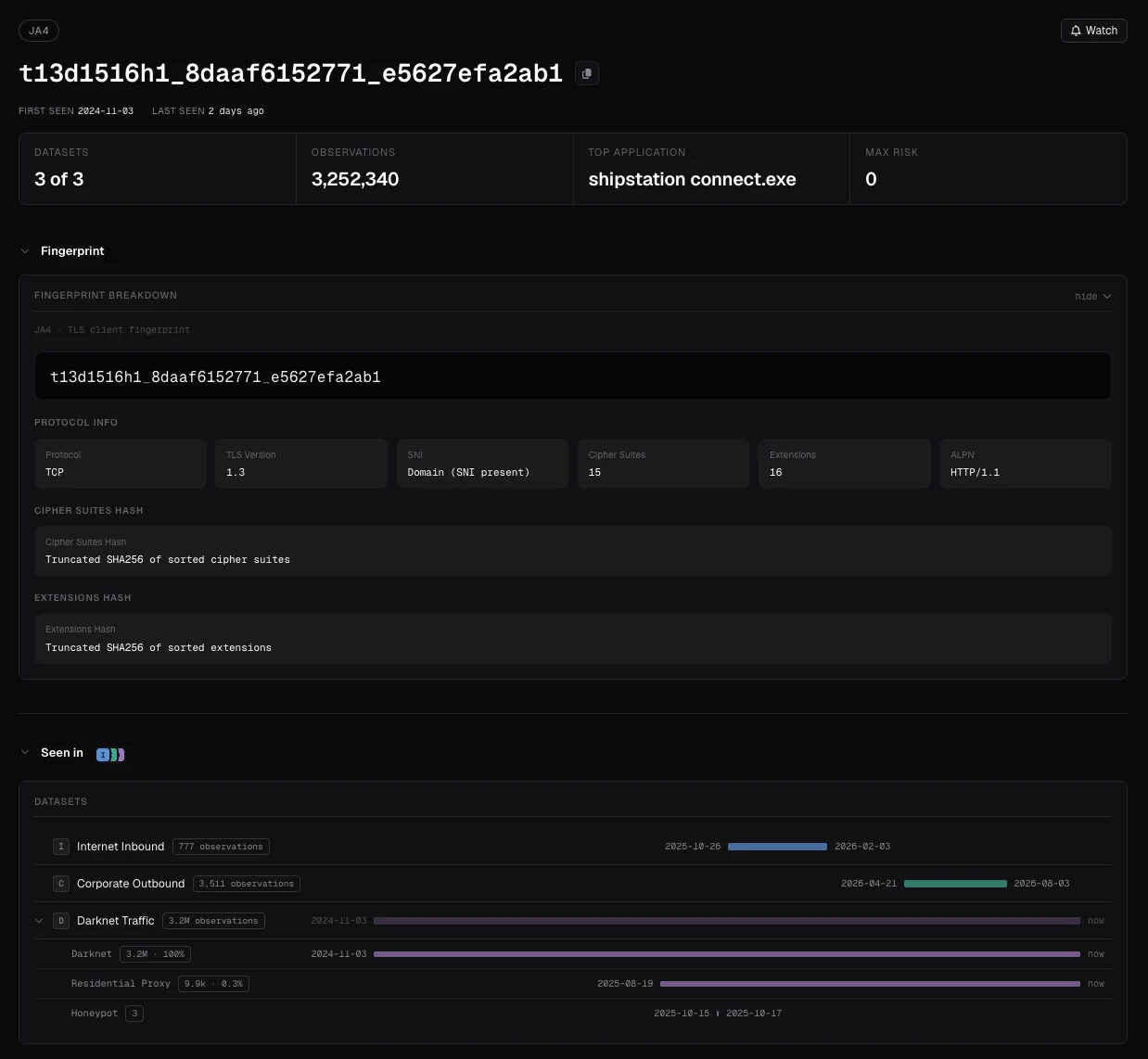
Each fingerprint page opens with when it was first and last seen, how many datasets hold it, the number of observations, the top application and the highest risk score. Below that, the page is organised in sections. What appears depends on the data available.
| Section | What it shows |
|---|---|
| Fingerprint | The fingerprint broken down: protocol, TLS version, server name (SNI), cipher suite and extension counts, ALPN, and how each hash is built. |
| Seen in | The datasets that hold the fingerprint, with the number of observations and the first-to-last-seen span for each. Webscout’s darknet traffic is split by sensor group. |
| What it is | The applications, operating systems, devices and user agents observed with it, and the share of each. |
| On the darknet | Daily activity on Webscout’s darknet sensors over the last month. |
| Dataset details | Per dataset: observations, first and last seen and risk, the applications, operating systems, devices, user agents and libraries behind it, and its activity. |
Data sources
A growing pool of telemetry, one search
JA4DB draws on the telemetry sources FoxIO has partnered with, and a lookup shows which of them have seen the fingerprint. FoxIO manages its partners and data providers, and the pool grows as new partners join.
01
Internet inbound
JA4+ fingerprints observed inbound by a FoxIO partner’s internet sensors, with the application, operating system and device each one identifies.
02
Darknet traffic
JA4+ fingerprints observed on Webscout’s own sensors, by sensor group (darknet, residential proxy and honeypot), with how often, when, and alongside which other fingerprints.
03
Device fingerprints
JA4T TCP fingerprints from a FoxIO partner, without MSS, attributed to operating system kernels and device classes.
04
Curated context
Curated tags from FoxIO that link fingerprints to the software, operating systems and tools that produce them.
Access
Search, watch, query or download
01
Search
Look up any JA4+ fingerprint, or search across sources with the query language, over any time range.
02
Watchlist
Watch a fingerprint or a saved search, and follow it as new observations arrive.
03
One API
List the sources you can reach, describe what each supports, and run a capability on it: filter, aggregate, look up, export, download or statistics. Every answer is JSON.
04
Downloads
The daily JA4+ roll-up, FoxIO’s datasets merged into one gzipped JSONL file with one line per fingerprint, and full datasets as SQLite files and DuckDB analytics databases. Downloads are data, not an on-premises deployment of the platform.
FAQ
Questions about JA4+ and JA4DB
What is JA4+?
A suite of network fingerprinting methods, created by FoxIO, for TLS, HTTP, SSH, TCP, X.509 certificates and more. The fingerprints are readable by people and machines, and describe the software behind a session without decrypting its traffic. JA4+ fingerprints explained.
How is JA4 different from JA3?
JA3 hashes a TLS client hello as it arrives, so a client that shuffles the order of its TLS extensions, as modern browsers do, produces many different JA3 values. JA4 sorts extensions and cipher suites and keeps a readable structure, so the same client keeps the same fingerprint and its parts can be compared at a glance.
How do I read a JA4 fingerprint?
A JA4 fingerprint such as t13d1516h1_8daaf6152771_e5627efa2ab1 has three parts. The first is readable: the transport (t for TCP, q for QUIC), the TLS version (13), whether a server name was sent (d) or not (i), the number of cipher suites (15) and of extensions (16), and the first and last characters of the first ALPN value (h1, for HTTP/1.1). The second is a truncated hash of the sorted cipher suites, the third of the sorted extensions followed by the signature algorithms, so fingerprints that share a part can be matched on it.
Does a JA4 fingerprint identify a single device?
No. It identifies the client software and how it is configured, such as a browser, a library or a piece of malware, so many devices running the same software share it. That is what makes it useful for grouping and tracking tooling, and why it is read in context rather than as an identity.
What does a JA4DB lookup return?
A page for the fingerprint: when it was first and last seen, the datasets that hold it and how often, its breakdown, the applications, operating systems, devices and user agents observed with it, its daily activity on Webscout’s darknet sensors, and the details of each dataset, including risk. What appears depends on the data available.
Does JA4DB include IP intelligence?
No. JA4DB is about JA4+ fingerprints. IP context, network flows and investigations are in the Webscout Observability Platform itself.
How do I get access to JA4DB?
Through FoxIO, which handles onboarding; Webscout builds and operates JA4DB for FoxIO. Then search in the interface, watch fingerprints and searches, query the API, or download the daily roll-up and the full datasets.
Access is through FoxIOFoxIO, the creators of JA4+, handle onboarding for JA4DB. Webscout builds and operates it for them. For the Webscout Observability Platform itself, write to info@webscout.io.